> ## Documentation Index
> Fetch the complete documentation index at: https://docs.flagsync.com/llms.txt
> Use this file to discover all available pages before exploring further.
# Overview
> Track feature flag exposure in FlagSync to measure flag variant impact.
## What Are Impressions?
Impressions record which flag variant a user sees—e.g., "Join Now" or "10% discount". They serve as the foundation for measuring feature impact in [Metrics](/metrics/overview) and [Experiments](/experiments/overview).
## Why Impressions Matter
Pair with events to calculate conversion rates (e.g., sign-ups per impression).
Enable variant comparison—e.g., does "Sign Up" outperform "Register"?
Provide exposure data for debugging or rollout validation.
## How to Access
* **View All**: See real-time activity on the [Events Dashboard](https://www.flagsync.com/dashboard/events/).
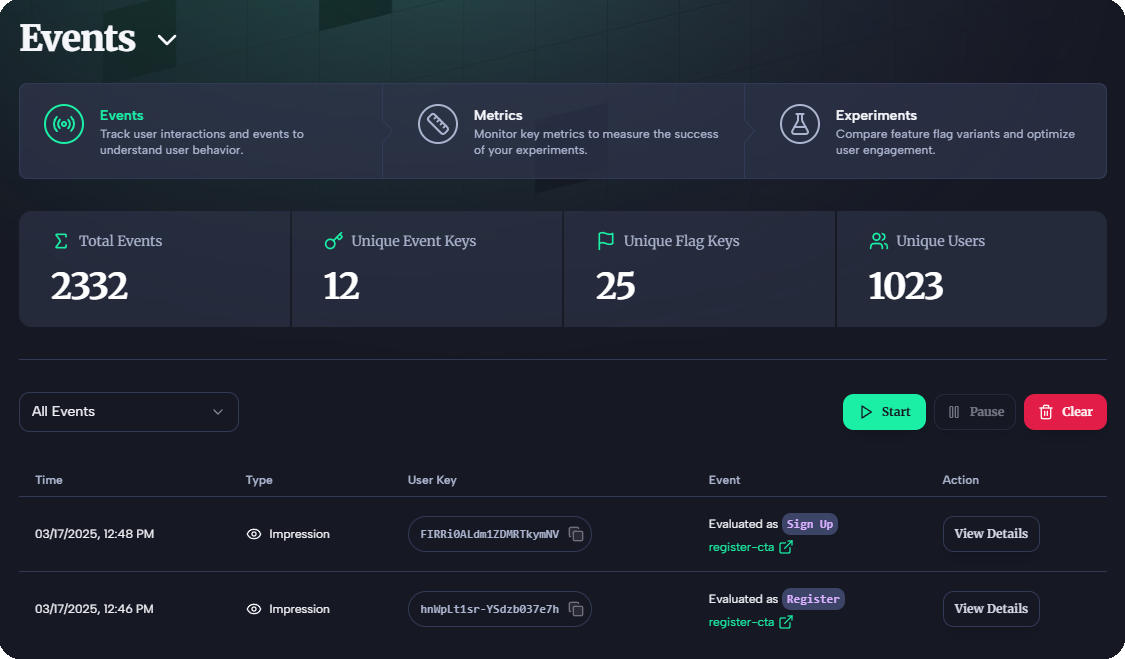 * **View for a Flag**: Go to the [Flags Dashboard](https://www.flagsync.com/dashboard/flags/), select your flag (e.g., `signup-cta`), and click "Live Tail".
## Next Steps
* Learn more in [Generating Impressions](/impressions/generating).
* Set up flags in [Quickstart: Integrate the SDK](/quickstarts/sdk).
* Explore [Events](/events/overview) for action tracking.
* **View for a Flag**: Go to the [Flags Dashboard](https://www.flagsync.com/dashboard/flags/), select your flag (e.g., `signup-cta`), and click "Live Tail".
## Next Steps
* Learn more in [Generating Impressions](/impressions/generating).
* Set up flags in [Quickstart: Integrate the SDK](/quickstarts/sdk).
* Explore [Events](/events/overview) for action tracking.