> ## Documentation Index
> Fetch the complete documentation index at: https://docs.flagsync.com/llms.txt
> Use this file to discover all available pages before exploring further.
# Conversion Rate
> Measure user actions as a percentage of flag exposure in FlagSync.
## What Are Conversion Rate Metrics?
Conversion rate metrics measure the percentage of users who perform an action after seeing a flag variant—calculated as:
```
(# of events / # of impressions) = % conversion rate
```
They track how often a specific event (e.g., a `signup-complete`) follows a flag impression, revealing which variants drive behavior in [Experiments](/experiments/overview).
## Example: Sign-Up Conversion
Let’s explore how a conversion rate metric tracks sign-ups for the `signup-cta` flag, testing which button text variant (`Join Now`, `Register`, or `Sign Up`) drives the most conversions:
Logs an impression each time the `flag()` function gets the text variant:
```jsx theme={null}
// landing-page.tsx
const value = client.flag('signup-cta', 'Register');
```
Track the `signup-complete` event when a user signs up:
```typescript theme={null}
// register-page.tsx
```
* In an [Experiment](/experiments/overview), FlagSync links these `signup-complete` events to `signup-cta` impressions to calculate conversion rates.
* If User ABC sees `Join Now` and later triggers `signup-complete`, FlagSync records it as a successful conversion.
**Timing matters**: Only events tied to prior impressions count—FlagSync ensures the user saw the variant before acting, ensuring accurate cause-and-effect.
### Sample Conversion Results
Here’s a hypothetical outcome of the `signup-cta` experiment, showing how many users sign up after seeing each variant (`Join Now`, `Register`, `Sign Up`) with 100 users per variant:
| Variant | Impressions | Sign Up Completions | Conversion Rate |
| -------- | ----------- | ------------------- | --------------- |
| Register | 100 | 15 | 15% |
| Sign Up | 100 | 25 | 25% |
| Join Now | 100 | 35 | 35% |
**Insight**: Join Now leads with 35%—it’s the most effective at driving sign-ups.
### Example Dashboard Insights
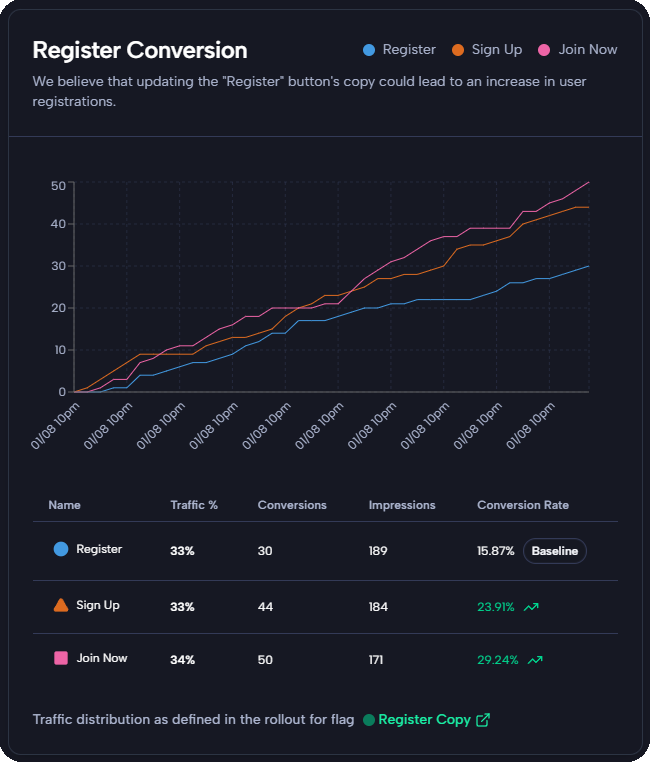
See a simulated FlagSync dashboard for the `signup-cta` experiment, testing how button copy variants (`Join Now`, `Register`, `Sign Up`) impact sign-up conversions over time:
* **Trend**: The chart shows `Join Now` (pink) leading over time, followed by `Sign Up` (orange), with `Register` (blue) trailing—confirming our example’s insight.
## Next Steps
* Track events in [Quickstart: Send Events](/quickstarts/events).
* Define metrics in [Quickstart: Define Metrics](/quickstarts/metrics).
* Test in [Quickstart: Create an Experiment](/quickstarts/experiment).
* Explore [Numeric Metrics](/metrics-numeric/overview).
 * **Trend**: The chart shows `Join Now` (pink) leading over time, followed by `Sign Up` (orange), with `Register` (blue) trailing—confirming our example’s insight.
## Next Steps
* Track events in [Quickstart: Send Events](/quickstarts/events).
* Define metrics in [Quickstart: Define Metrics](/quickstarts/metrics).
* Test in [Quickstart: Create an Experiment](/quickstarts/experiment).
* Explore [Numeric Metrics](/metrics-numeric/overview).
* **Trend**: The chart shows `Join Now` (pink) leading over time, followed by `Sign Up` (orange), with `Register` (blue) trailing—confirming our example’s insight.
## Next Steps
* Track events in [Quickstart: Send Events](/quickstarts/events).
* Define metrics in [Quickstart: Define Metrics](/quickstarts/metrics).
* Test in [Quickstart: Create an Experiment](/quickstarts/experiment).
* Explore [Numeric Metrics](/metrics-numeric/overview).