

What Is Live Event Tail?
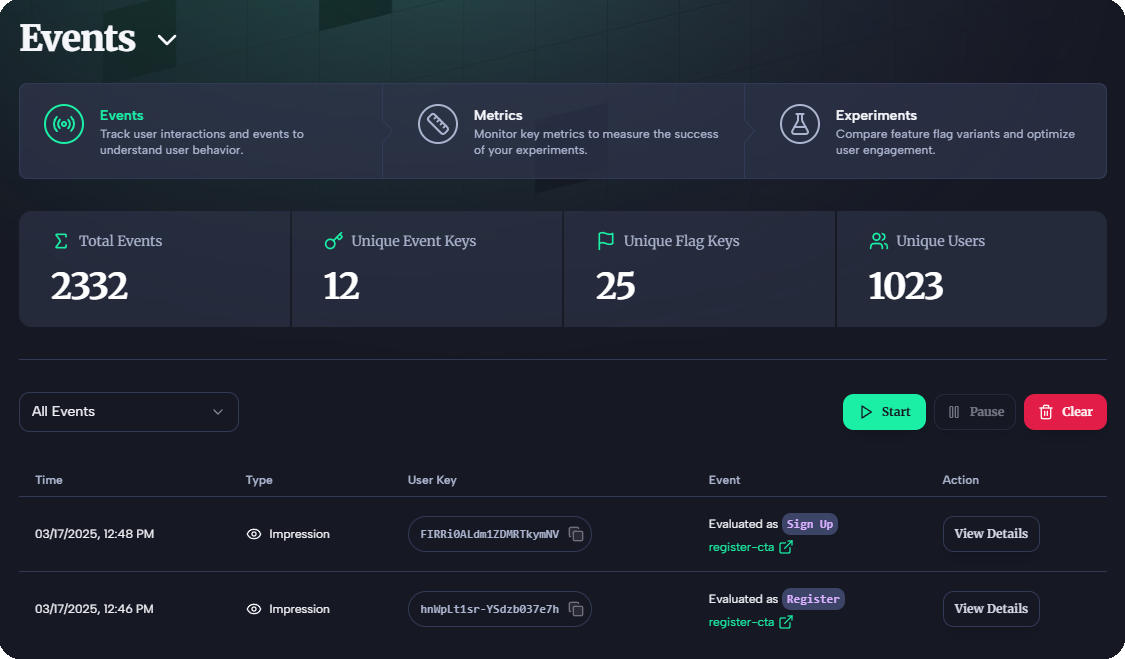
Live Event Tail lets you watch impressions and events as they happen, available on Team and Pro plans. It tracks:- Events: Generated when you call
client.track()—user actions like clicks or purchases. - Impressions: Logged automatically with every
client.flag()call—showing which flag variant users see.
How to Access
View All Live Events and Impressions
-
Go to the Events Dashboard to see real-time activity across your environment.
View Live Impressions for a Flag
- Navigate to the Flags Dashboard.
- Select your feature flag (e.g.,
signup-cta), then click the “Live Tail” tab.
Why It Matters
- Developers: Debug issues or verify
track()andflag()calls instantly. - Product Managers: Monitor feature performance live—e.g., how
Join Nowimpressions convert.
Next Steps
- Learn about Events and Impressions.
- Start tracking in Quickstart: Send Events.
- Set up flags in Quickstart: Integrate the SDK.